
How to Use Digital Scenery in a School or Community Theatre Show
If you direct school or community theatre, you've probably looked at digital scenery and wondered whether it's really for you - or whether it's something only big-budget houses can pull off. The short answer: it was built for you. Most of the productions that run our scenes are schools, community theatres, and regional companies working with real-world budgets and borrowed equipment.
This is the practical guide: what you actually need, how it works during a show, and how to try it before you spend anything.
What You Actually Need
The equipment list is shorter than most directors expect:
A projector - bright enough for your stage. Many schools and churches already own one that works. If not, rentals are inexpensive, and a purchased projector serves every future production.
A surface - something for the image to land on: a projection screen, a cyc, or even a light-colored wall. It doesn't need to be fancy; it needs to be the right size for your stage.
A computer in the booth - the scenes run through our SceneCaster software, which plays each scene as a cue, the same way your light board plays lighting cues.
An operator - someone to call the cues. If you have a student or volunteer who can run a light board, they can run this.
That's the whole list. No flown scenery, no crate deliveries, no storage unit between shows.
How It Works During a Performance
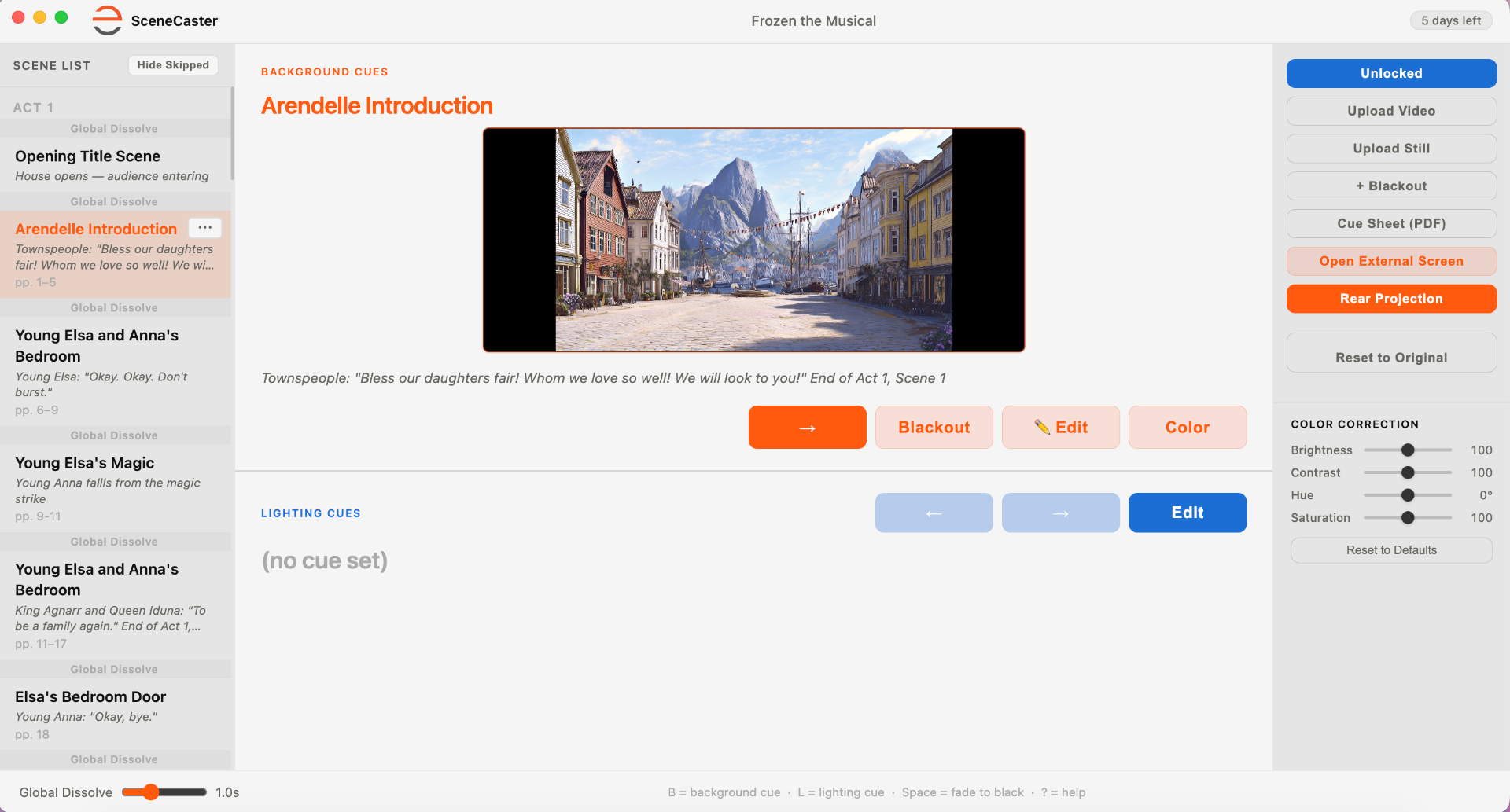
During the show, digital scenery behaves like any other cue. The booth operator sees the scene list in order, and when the stage manager calls the cue, they advance to the next scene. The audience sees the world change exactly on the beat the director chose.
Because each scene loops seamlessly, the timing pressure is off. A scene can hold for a ten-second transition or a ten-minute dialogue passage - the image never runs out, never visibly restarts, and the transformation only happens when the operator triggers it.
That means your show's pacing stays in your hands. A nervous actor who skips a line doesn't break the scenery; the scene simply holds until the moment is right.
What It Does for a Small Budget
The economics are the part that matters most for school and community shows:
Every location in the script - a full production package covers every scene, including the quick transitional moments that would never justify a rented drop.
A fraction of the build cost - no lumber, no paint, no crew weeks, no disposal. The scenery is licensed, not built.
Nothing to store - when the run ends, there's no flat storage problem and nothing to throw away.
Full and Junior versions - for shows that offer both, we build matching Junior editions, so a school doing the Jr. cut gets scenery made for their actual script.
The result is that a small stage can put an ice palace, an open ocean, or a grand ballroom behind its actors - places a school shop could never build.
The Questions Directors Ask Us Most
Will it wash out under our stage lights? Projections and stage lighting do interact - but scenes are built bright, and a few simple choices (aiming, surface, and keeping front light off the projection surface) solve it in most venues. Testing in your space settles it definitively.
Can a student run it? Yes. If they can run cues on a light board, they can run SceneCaster. Many of our productions are crewed entirely by students.
What if our projector isn't great? Try it first. A modest projector on a good surface in a darkened house goes further than most people expect - and a free preview test will show you exactly what your gear can do.
What happens if something goes wrong mid-show? The current scene simply keeps looping. There's no clip that can "end" at the wrong moment, so a missed cue means the world holds still, not that it falls apart.
Try It in Your Venue First - Free
The single best way to know whether digital scenery works for your production is to see it on your own stage, with your own projector, under your own lights. Photos and demo reels can't tell you that - only a test in your space can.
That's why we send free preview scenes. Tell us your show and we'll send sample scenes you can run in your venue, on your equipment, with no commitment. If it looks the way you hope, you'll know. If your setup needs adjusting, you'll find out before opening night rather than during it.
It's not magic, it's production.
- James
Frequently Asked Questions
What equipment do I need for digital scenery?
Four things: a projector bright enough for your stage, a surface to project onto (a screen, cyc, or light-colored wall), a computer in the booth running our SceneCaster software, and an operator to call the cues. Many schools and churches already own most of this.
Can a student run the projections during a show?
Yes. If a student or volunteer can run cues on a light board, they can run SceneCaster. Each scene appears as a cue in order, and many of our productions are crewed entirely by students.
What happens if a cue is missed mid-show?
The current scene simply keeps looping. Every scene loops seamlessly, so a missed cue means the world holds still - never that a clip ends at the wrong moment or the scenery falls apart.
Will projections wash out under stage lights?
Projections and stage lighting do interact, but scenes are built bright, and simple choices - projector aiming, surface selection, and keeping front light off the projection surface - solve it in most venues. Testing a free preview scene in your space shows you exactly what your gear can do.